Left Mouse Button: Move, Attack, Lean, or Sit-down options
Right Mouse Button: Use spells or skills
[Ctrl] + Mouse Button: PK Attack
F1: Help Menu
F2: Dialogue Toggle
F3: Whisper mode On/Off
F4: Adjust Chat Window
F5: Toggles MUssenger chatting window when receiving incoming message
F6: Hides MUssenger chatting window
Enter: Opens Text Box
Shift: Holds Character position
Spacebar: Picks up Item/Zen
Print Screen: Takes Screen Shot
ALT: Displays Item name on ground
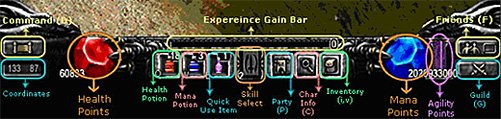
C: Character Stats
I/V: Inventory
M: Warp Menu
D: Command List
Q: Uses default health item
W: Uses default mana potion
E: Uses item that is put into Shortcut
F: Opens/Closes MUssenger
P: Party Window
G: Guild Window
Numbers (1-9): Select Spell/Skill Binds
CTRL + number (1-9): Bind spells/skill to number
Command List
This is a window that is brought up by pressing "D" on the keyboard. It is an alternate way of using commands without typing /. Just left click on command choice then right click on the player you wish to use it on.