|
Beginners Guide - Party |
|
|
 |
 |
Macros
Setting up a macros is like using Hot Keys. The player can set a
sentence or command to any digit (0-9). To set the Macro the player
must type "/ '#' " into the chat box, followed by its sentence or
command.
ie. "/1 /warp lorencia", now the warp to Lorencia command is set to the number 1 macro.
To activate the Macro all the player must do is press ALT + the
number the macro was set to. In the previous case ALT +1 would warp the
player to Lorencia.
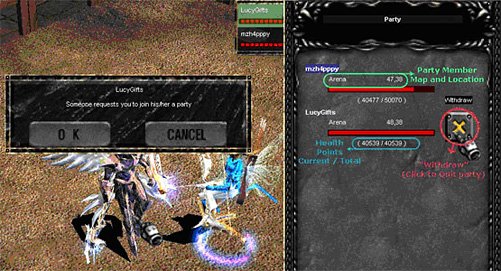
Party System
It may be fun to train on your own, but may be even more
beneficial to train in a Party. Every now and then you will be asked if
you want to join a Party.
Though not as much EXP is obtained when partied with higher members,
the EXP is so much faster that should compensate for the drop in EXP.
Also when higher level, it is to the player's advantage to help train
the lower level characters. Higher level characters get a boost in
experience when partied with lower level "noobs", and can also obtain
another boost if one of the Three Main Characters (DK, DW, Elf) is in a
party. There can be a MAX of 5 players in a single Party.
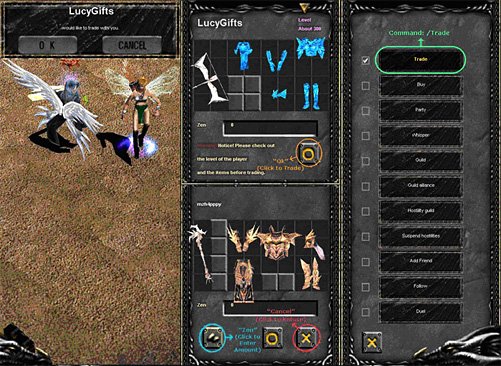
Trading System:
While playing Global MU Online, you as a player may want to
make trade transactions and deals with other players. When this occurs
you will be prompted to begin a trade, and select Yes/No. If Yes is
selected, an inventory slot will open where you may trade items and zen
between players.. Items for trade are up to the players discretion, but
pleased be aware for trade scams, TRADE AT YOUR OWN RISK.
|
 |
 |
|
|
|